
If we had to summarize in one sentence what Cloud Computing is, we could say that it is a concept of offloading resources onto remote servers as opposed to traditional hosting on the user’s machine. In this article, we will try to help you understand both the stakes of Cloud Computing and to explain its applications in the most playful way possible. So don’t be surprised to hear terms like “virtualization”, “dematerialization”, or even “platform”, “online”… and to see that all of this is connected to a concept of computing in the clouds!
At first glance, this may seem complex, but know that all these notions will undoubtedly be more than basic in a few years. We cannot escape it, and already all the major computer and Internet groups have crossed the threshold to offer dematerialized services: Google, Amazon, Yahoo, IBM, HP…
The simplest way for you to gain an understanding from this homepage and to want to learn more is for me to illustrate a possibility of the cloud computing concept.
Take, for example, your word processing software. Most of the time, it is Microsoft Word or sometimes Open Office. In short, it doesn’t matter! What matters is that this traditional software is installed on your personal computer. With cloud computing, you connect to the Internet, wherever you are, with any computer, and you directly access both a word processing software and all your documents stored online. Is that clearer? Let’s dive into the details.
Cloud computing, virtualization, and dematerialization
Always on the lookout for the “next novelty” when talking about new technologies and the Internet, many of us have already heard these terms: cloud computing, virtualization, and dematerialization. There is no doubt that the future generation of the Internet (better known as Web 2.0) will have a particular impact on how we interact and communicate with each other, be it for individuals or professionals. Web 2.0 essentially describes this whole movement of social networks on the Internet. It includes, but is not limited to, sites like Facebook, MySpace, or Twitter that allow users to share their interests, stay in touch, and get to know each other, representing the first step into this universe of cloud computing.

This emerging concept we call “cloud computing” can change our way of working and is already starting to set in. First, let’s not try to find a translation in French because no one would dare sell “computing in the clouds.” In a few words, it is the ability to use resources and tools via the Internet without owning or being close to them, you just need to be able to access them.
The term “cloud” is used to indicate the entire set of computing services (processing and calculation) accessible via the Internet. Cloud computing is a description that encompasses the various networks connected by the Internet, located in data centers (datacenter) around the world; networks that provide us with the services and applications we use in our everyday lives. Many professionals have embraced this concept of using resources over networks and utilize one or more of these cloud computing services:
- Infrastructure as a Service (IaaS), user access to physical infrastructure on demand.
- Platform as a Service (PaaS), a development environment via a Cloud infrastructure.
- Software as a Service (SaaS), a software application that the user accesses online without local installation.
Cloud computing, SaaS, PaaS, IaaS …
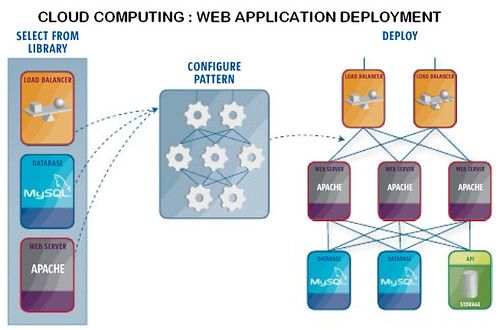
In simpler terms, Infrastructure as a Service (IaaS) is a cloud computing service that frees the enterprise from the need to own (manage, maintain, and control…) its own servers and other data processing infrastructures. Only a computer or laptop connected to the Internet is required to guarantee its business functionality. This access is a form of subscription to entities that market these hardware virtualization services. The reduction in acquisition, maintenance, and recycling costs for equipment is significant for companies. The risk of downtime and interruption of activity is also minimized, given the high reliability of this type of online service.
In the end, it is a considerable saving of time and money for clients of this form of cloud computing.
Platform as a Service (PaaS) is also known as “cloudware“. This other virtualization service concerns the provision of development tools online for application and web service creators. Just like IaaS, there is no interest in the internal workings of the “machine”; it is a solution that allows users to reduce their costs and access, on demand, the tools they will need. Application developers can use an online development environment without worrying about servers, hardware, software licenses, or databases.
The Software as a Service (SaaS) is defined as a subscription access to applications via the Internet. Access is achieved online and does not require installation on the local computer. Several applications designed or offered by Google fall into this category of cloud computing. Many of us have likely used these sites where we can send and share photos and videos with friends and family. These solutions are becoming increasingly popular, as users do not need to install and update software at home; they just need to connect and use it when they need it.
The next time you are online, you might want to send a photo and use online editing tools to modify it; you will then have participated in this cloud computing movement. The photo will likely be stored on a site that uses the IaaS virtualization service for its data servers, PaaS for the software that allows you to edit your photo, and SaaS applications that you will use to access your email account, or your social networking site to publish your photo and share it with friends.
Advantages and disadvantages of Cloud Computing
Illustrated by a cloud in networking manuals, the cloud was initially just a metaphor for the Internet and all the unknown complexities that exist outside the home network. However, recent years have given it a whole new meaning, and cloud computing is now in the jargon of every programmer, application developer, or experienced Internet user.
With cloud computing services, one can access their information using only an Internet connection. All processing and labor work will be done by other computers (typically servers). The data will also be stored there, as well as access rights. We pay according to the amount of data and processing time we use.

At first glance, all of this seems very interesting. One can buy a small netbook for less than 250 euros and use it for all the applications they want. It is somewhat a client/server model extrapolated over a gigantic network with an eye towards virtualization. But let’s not forget that all these paid cloud computing services must be profitable for their sellers, and below a certain number of subscribers, a service may cease to exist. Because even though you are a loyal subscriber to a certain application and use it daily in your personal or professional activities, it may no longer be popular among other users, and the service offering will cease due to successive losses of renewing subscribers, leaving you without even a physical copy of your favorite application. And just if you manage to obtain a downloadable version, think also about buying a powerful enough machine to run your software, because remember that the old one was just powerful enough to connect to the Internet and access it as a cloud computing service.
Between hardware longevity and technical risks…
In cloud computing, we also talk about hardware longevity. No one wants to invest thousands of euros in new acquisitions only to end up with obsolete and outdated equipment; in that case, virtualization is preferred. In the gaming domain, some hardcore gamers buy new graphics cards or processors and increase their RAM, even at the announcement of an upcoming new game release.
But if such a game could be launched over the Internet with a high-speed connection, and a powerful gaming server handling the processing, one would only need a simple computer to use it while accessing a cloud computing service. The server would translate game sequences into vectors and send them to the client computer; the player could then use Windows, Linux, or Ubuntu, as long as their system can handle high-speed connections and some Internet protocols. However, the player would only have an interactive video of the game in front of them, and in terms of graphics, they might feel the difference compared to a similar game installed and played locally.
Another seemingly ideal situation, comparing the price of a physical copy with that of a subscription that would last, let’s say, the time it takes to finish the game and defeat the big boss, would definitely be a good deal. But for games like World of Warcraft, Call of Duty 4, Starcraft II, or HALO, where the multiplayer experience is worth more than the storyline itself, the playtime is nearly unlimited and the subscription is set to last. Be sure that the game developers are well aware of this and will charge accordingly.
Now, from a professional point of view, we who are already quite dependent on cloud computing, even just for our emails, will our data ever be stored on the same server as that of our competitors? A bit paranoid as a supposition, granted, but let us imagine that in addition to the email service, we have also opted for another cloud computing service for file storage or schedule management. Does this centralization not suffer from the risk of server vulnerability? One only needs to remember a recent Google outage in Europe that was caused by a software update. There’s no need to imagine the confusion it would have caused for clients of a cloud computing service. These are of course very minimal risks, but they must be taken into account.
But the risk that is not so small in these types of cloud computing services is that your connection goes awry. Weather conditions, construction work, moving, traveling—these are all reasonable causes of Internet connection interruptions. So you find yourself without access to your own data, applications, or other work tools/resources, and you better remedy this problem quickly since most hosts get impatient about their storage space after a few months. Perhaps you should have kept archived copies after all.
With all the virtualization advantages we know, we should also weigh their disadvantages and understand them well before subscribing to any particular service, especially if an essential business activity depends on it. Many efforts remain to be made in terms of confidentiality, rights of ownership, and reliability for cloud computing services.
Cloud Storage and Total Security
Using the cloud to store any of your data through Cloud Computing Data Centers can prove to be an excellent option for you! You’ll find many services offering you a lot of storage space for relatively low costs, accessible practically from anywhere.
With Cloud Storage, you want to opt for a secure option, free from viruses in particular. That’s the case; major services offer optimized services in this regard, however, it is difficult to talk about total security. Here are 10 tips that will help you ensure complete security for your data.
Passwords
This will surely seem obvious to most of you, but try creating a username and password for each of your accounts. At the very least, try to use a unique password, containing various symbols at maximum. Cracking a password takes much longer for a hacker when symbols and capitals are used.
Security Questions for Password Recovery
Choosing a question that is personal enough is not obvious. You must absolutely find a question whose answer cannot be found on Facebook or elsewhere on the Internet. You might consider choosing a question and answering it with the answer to another question. For example, you could set the password recovery question as “What is my dog’s name?” and answer it “Versailles”.
Data Encryption
If you plan to store particularly sensitive data, do not hesitate to use a method to encrypt your data before storing it in the Cloud. This solution does require a bit more technical know-how than the previous two. Many software solutions for encryption/decryption exist that will make your data completely unreadable.
Password Management Software
There are many password management software solutions on the market, such as LastPass, which is free. These programs can manage tons of passwords and usernames for you, so you can’t go wrong and can easily vary your login credentials.
Two-Factor Authentication
Some services offer this mode of securing your connections. With this option, your identification code can be renewed at regular intervals. In this case, it may happen that your access code is sent to you by SMS. There are several ways to do this; it is certainly a bit more cumbersome but more secure.
Data Backup
So you wish to store all your information in the Cloud. If you are considering it as a backup solution, do ask yourself if a complementary physical backup is not indispensable. Cloud solution sellers will tell you no, but it’s up to you to see how sensitive your data is.
Delete Obsolete Data
If some of your documents turn out to be obsolete, if you think you no longer need them, we advise you not to leave them in the Cloud. If you want to keep them, choose an alternative physical storage solution. If a breach were to occur, you may expose information to thieves. In terms of security, it is customary to say that financial documents should always be deleted from your mailboxes after being read.
About Your Internet Connection
If you are connected from a public account, ensure that you have logged out properly. It’s common sense, yes, but also a big mistake that’s easy to make. Also, in the same case of connecting from a public medium, be sure to delete the saved information in your web browser’s cookies.
Anti-Virus and Anti-Malware Software
Your data hosted in the Cloud may not already be physically on your computer, but in any case, to access it, you need to use a computer. Therefore, we can only advise you to use good protective software, even if your service provider assures you of anti-malware protection. The issue is not necessarily to doubt the quality of the security provided by these services but rather that of the computer you are using. Know, for example, that there are spyware programs capable of storing your login credentials. Be sure to protect your computer.
Be Discreet
Avoid sharing your confidential information, such as login credentials, as much as possible, especially regarding cloud computing storage. If you want to optimize the security of your data, avoid telling people who your provider is, for instance. Common sense is probably your best protection. Good luck.
The Major Players in Cloud Computing
Google Cloud
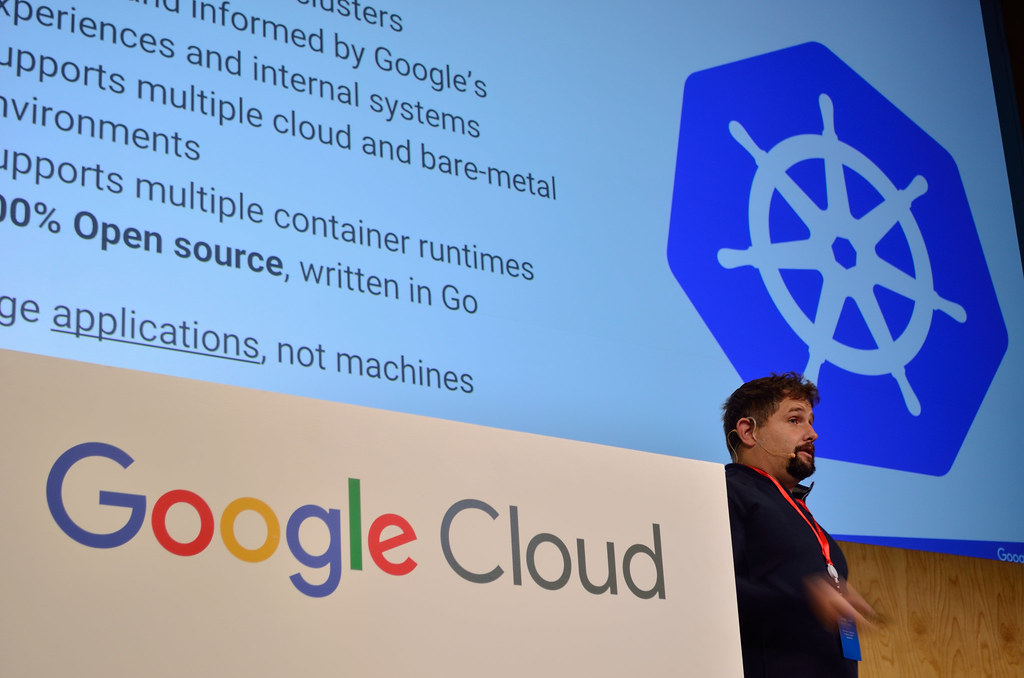
A startup in full growth searching for basic office tools may find its answer in cloud computing. Google Cloud provides a robust package to manage activities smoothly and efficiently. This cloud computing suite includes an Internet email service, internal messaging, a calendar, and office tools. The company can then free itself from these concerns and focus on its core business.
The strong point of Google Cloud is its portability. Wherever you are, and using your preferred browser, you can create or access office files using Google Docs, such as text documents, spreadsheets, etc. Google Calendar is the smart assistant that not only helps you schedule your week but also reminds you of an event or appointment by sending you an SMS on your mobile.
Google Apps is not just for startups; large companies have realized that this cloud computing service offers them very interesting advantages. The document or spreadsheet is always updated, and the team, as well as clients working in the network, are assured that the necessary modifications have been recorded in the correct version of the file.
Costs are also reduced: no specific equipment or software is required when subscribing to these cloud computing services, and only minimal administration is necessary. A significant saving of money and working time, leading some studies to claim that one spends a third of what most competitors charge for cloud computing services.
And the best part is that you won’t need to update your service every time. Google Apps is well-positioned in cloud computing to offer you the best every day for your business.
Amazon AWS formerly EC2
Amazon Web Services, formerly EC2, is a network of servers provided by Amazon that clients can access as an online service.
Geographically, Amazon AWS distributes the resources that the client needs for their application. The client pays for storage space and bandwidth, saving money on the installation and maintenance of their own servers. This is the principle of cloud computing.
AWS creates multiple instances of an Amazon machine image, which are essentially the files of a standard web application, a virtualization of a master copy that is in their storage system. Clients can then create their own instances of this image, which will be stored on various Amazon servers installed in distinct geographical areas. In the event of a natural disaster or widespread failure in one area, data can be recovered from identical instances stored in other locations.
This virtualization is ideal for web applications with a large number of accesses. Mission-critical professional applications and high-traffic sites will recoup their investment by transitioning to cloud computing. Instead of installing new servers in the company’s data center or creating and managing a link to new servers at a remote site, companies will only have to opt for AWS. An employee can connect and click a few buttons through an API (an AWS extension for Firefox, for example), and their new server will be installed.
However, cloud computing may not be the ideal solution for a business where a single employee could manage the company’s servers. What overload could he eliminate? Specialized server providers like SoftLayer can dedicate a server to him in an hour or two. An AWS online service would definitely not be cost-effective in this case, especially in terms of bandwidth; the rate for online storage remains quite reasonable.
So, instead of seeking to join the cloud computing space, small businesses would do better to equip themselves with virtual private servers or dedicated physical servers. Because unless one is proficient in configuring web servers, the best option for personal pages and portfolios remains hosting. But for larger entities, with critical professional applications and significant websites, Amazon EC2 will save them money in the medium to long term by reducing site overload and increasing reliability and scalability.
Microsoft Azure

In one of their recent conventions around cloud computing, a developer from Microsoft announced that the next versions of their operating systems will be developed in parallel. There will be “Bidirectional Innovation Transfer” between desktop systems dedicated to the office and those online dedicated to the cloud. His colleagues do not envision replacing desktop systems with a system like Azure; they believe that users will eventually consider the cloud as a separate computer.
Microsoft is rethinking the definition of an operating system in this new era of cloud computing.
Azure is Microsoft’s contribution to this information world that is increasingly moving into cloud computing. This system is designed to be the background of their cloud, with the visible interface being an environment composed of various different equipment. The official definition is clear: “Windows Azure is designed to run on a large number of machines, all located in Microsoft’s data centers and accessible via the Internet“.
Azure and Amazon
When comparing Microsoft Azure’s virtualization services to Amazon’s cloud computing offering, one might say that developers make great efforts focusing on Amazon’s hosting system, while Azure advocates a very different philosophy: its engineers concentrate on installing a certain logic that is then adapted to the client’s demand. At Microsoft, it is acknowledged that Amazon is leading the cloud computing world ahead of everyone else, as it is thanks to this competition that both firms are making so much effort in innovation.
The End of Windows Office?
It is currently unknown whether Azure will have ambitions regarding Microsoft’s main market shares. It is only rumored that there will be a varied offering of types of online licenses; some will allow the use of both systems (desktop and cloud) simultaneously, while others, even more innovative, will be tailored to the current movement of cloud computing.
IBM Lotus Live
To understand that Lotus has never been very far from this cloud computing movement, all we need to do is look back a little.
In 1973, a certain David Wooley launched his PLATO Notes, an online messaging service. Later, he teamed up with Mitch Kapor from Lotus and Ray Ozzie to form Iris Associates, a group that focused on developing products that combined the capabilities of computers with those of the early collaborative tools of PLATO. Iris handled the development of new systems, while Lotus took care of marketing. With the great success of Notes R3, Lotus acquired Iris, and IBM later bought Lotus. Ozzie, for his part, eventually created a new company that would be acquired by Microsoft, and he currently finds himself as a key player in Azure, Microsoft’s initiative in the cloud computing world.
In this cloud computing offering, LotusLive includes an advanced email management service, shared calendar, and instant messaging for $5 per user per month. For $10 per month, you can benefit from video conferencing, a social network, and other collaborative tools. They even plan to launch a service called “Communities,” which will allow for collaboration to extend to external communities. A growing niche that attracts many startups like Yammer, StatusNet, Sociacast, or Jive Software. IBM also focuses on integrating its core applications with solutions like Salesforce.com, United Parcel Service (UPS), Skype, and LinkedIn.
This recent LotusLive certainly has nothing to be ashamed of. And it is in its own context that the true significance of this advancement will become clearer: IBM and Microsoft have been, and will always be, involved in the development of cloud computing and collaborative tools.
The Challengers
The movement of cloud computing is a picture of tomorrow’s computing, of hardware power, services, and software that will be available in the nebulous Internet and consumed according to needs. Emails and messaging are the precursors of this movement, and networking, collaborative work, and virtualization will be its continuity. Which IT sector player would want to be left behind in this adventure?
Fujitsu has just announced the launch of its new cloud computing strategy in four usage models: infrastructure, application, activity, and content. With an existing infrastructure in about 91 data centers across 16 countries, and with great experience in IT services, they are not afraid of competition and present their offer as an enhancement of the main functions that every business needs.
HP, Intel, and Yahoo have, for their part, created Open Cirrus, the largest open-source testing bank, dedicated to boosting advances in cloud computing research. Prestigious organizations and universities effectively contribute to this program.
Open Cirrus simulates a global environment in real conditions and provides researchers with the unique opportunity to test their applications, accurately measuring the performance of services and infrastructures. Launched in 2008, it was in response to resistance to innovation in the cloud computing field, and a way to bypass certain logistical and financial obstacles.
Over 80 projects of research are currently being studied within this program. Carnegie Mellon University, for example, uses Open Cirrus, in collaboration with Intel, in its research activities on stem cells, regenerative medicine, and tissue engineering. HP uses it to calculate and assess the reliability and impact of cloud computing, and Yahoo sponsors research projects in computing, such as speech processing and distributed e-learning applications.